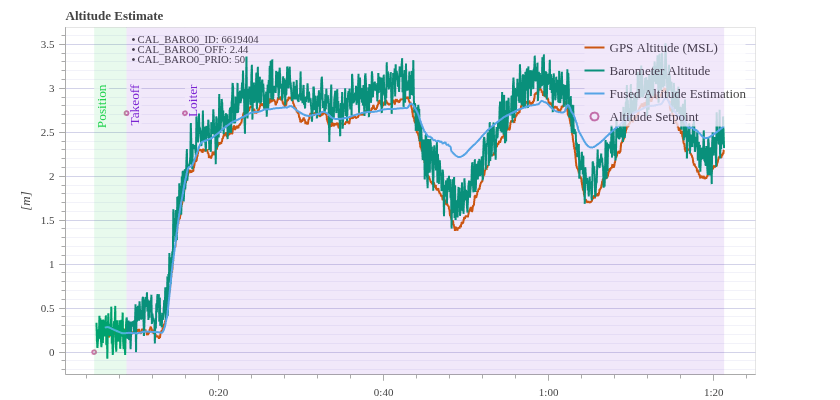
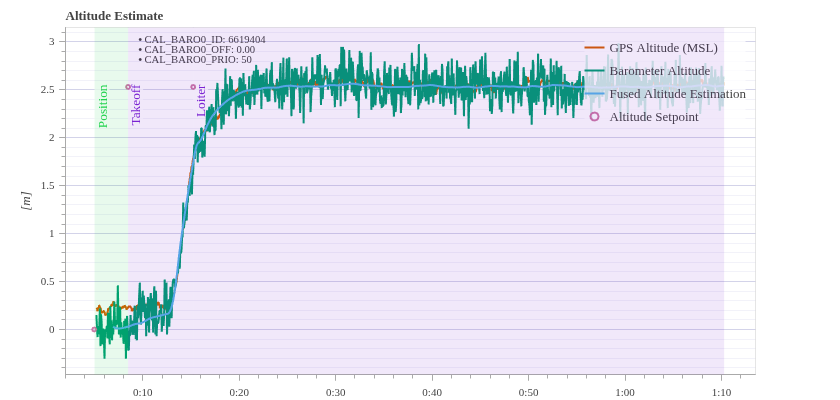
I’ve been working on setting up a swarm simulation (3x x500 drones) in Gazebo (Harmonic). I moved from using the standard make px4_sitl gz_x500 command to manually launching the PX4 binaries and Gazebo server/client in separate terminals.
The Problem
When I launch a single drone using the standard developer command: make px4_sitl gz_x500 …everything works perfectly. The flight is smooth, and the Real Time Factor stays above 98%
However, when I try to replicate this manually (to split the server/client or run multiple instances) using the exact same binary:
…the drone immediately exhibits “bobbing” behavior (oscillating up and down) and the logs have sporadic: ERROR [sensors] Accel #0 fail: TIMEOUT!
And WARN [health_and_arming_checks] Preflight Fail: High Accelerometer Bias
Notifications
When running 3 drones the bobbing behaviour becomes worse. My Hardware usage doesn’t seem to be an Issue, CPU usage stays below 60% (there is no individual core that has higher usage than the others) and my GPU also stays below 40%. Ram is below 50% usage.
How do I spawn multiple drones without the oscillating altitude? My final objective is to have three drones fly a basic leader-follower mission, but I need to get the three drones hovering reliably before I can do that.
I do the same (launching gz sim and then px4’s binary) in this tmuxinator template and I don’t observe this issue: I would maybe double check that the world.sdf opened by default by gz-sim and the one opened by default by make px4_sitl (I think in the airframe romfs) have the same physics, plugins, etc.
Thank you, I have implemented a method similar to the template and my simulation has improved. Two drones can now maintain a stable hover. Introducing a third drone causes instability again, but that must be due to hardware limitations I am assuming. Three drones with RTF=0.8 works smooth.
What type of machine are you using? As long as Gazebo rendering runs on GPU (you can check the OpenGL renderer with glxinfo -B), I think the main bottleneck is single core performance for the physics but that still is 8-10x RTF on an i7-11 for a single drone on my setup
adding flag “-v4” to gz-sim gives more verbose output and information about the rendering
“glxinfo -B” gives information about the OpenGL renderer (in my case an NVIDIA card, although I noted that on laptops with hybrid graphics that often defaults to Intel integrated graphics unless one deliberately sets “sudo prime-select nvidia”)