

I’m trying to start the px4_sitl after running the gazebo sim separately, either through gz sim or ros2 launch ros_gz_sim. I want to do it so that I could launch it with other robots, not only px4-enabled ones.
I’m using Ubuntu 24.04, ROS Jazzy, Gazebo Harmonic and the main branch of PX4-Autopilot.
I changed two environment variables so that other errors would be resolved:
export GZ_SIM_RESOURCE_PATH=$GZ_SIM_RESOURCE_PATH:$HOME/PX4-Autopilot/Tools/simulation/gz/models:
export GZ_SIM_SYSTEM_PLUGIN_PATH=$GZ_SIM_SYSTEM_PLUGIN_PATH:$HOME/PX4-Autopilot/build/px4_sitl_default/src/modules/simulation/gz_plugins
The drone spawns on the world, but doesn’t pass health checks, probably due to a lack of working sensor links.
Output from make px4_sitl gz_x500:
[0/1] cd /home/igorazevedo/PX4-Autopil...topilot/build/px4_sitl_default/bin/px4

______  __   __    ___
| ___ \ \ \ / /   /   |
| |_/ /  \ V /   / /| |
|  __/   /   \  / /_| |
| |     / /^\ \ \___  |
\_|     \/   \/     |_/

px4 starting.

INFO  [px4] startup script: /bin/sh etc/init.d-posix/rcS 0
INFO  [init] found model autostart file as SYS_AUTOSTART=4001
INFO  [param] selected parameter default file parameters.bson
INFO  [param] importing from 'parameters.bson'
INFO  [parameters] BSON document size 464 bytes, decoded 464 bytes (INT32:17, FLOAT:6)
INFO  [param] selected parameter backup file parameters_backup.bson
  SYS_AUTOCONFIG: curr: 0 -> new: 1
+ SYS_AUTOSTART: curr: 4014 -> new: 4001
  SENS_BOARD_X_OFF: curr: 0.0000 -> new: 0.0000
  SENS_DPRES_OFF: curr: 0.0000 -> new: 0.0010
INFO  [dataman] data manager file './dataman' size is 1208528 bytes
INFO  [init] Gazebo simulator 8.10.0
INFO  [init] gazebo already running world: empty
INFO  [init] Gazebo world is ready
INFO  [init] Spawning Gazebo model
INFO  [gz_bridge] world: empty, model: x500_0
INFO  [commander] LED: open /dev/led0 failed (22)
INFO  [uxrce_dds_client] init UDP agent IP:127.0.0.1, port:8888
INFO  [mavlink] mode: Normal, data rate: 4000000 B/s on udp port 18570 remote port 14550
INFO  [mavlink] mode: Onboard, data rate: 4000000 B/s on udp port 14580 remote port 14540
INFO  [mavlink] mode: Onboard, data rate: 4000 B/s on udp port 14280 remote port 14030
INFO  [mavlink] mode: Gimbal, data rate: 400000 B/s on udp port 13030 remote port 13280
INFO  [logger] logger started (mode=all)
INFO  [logger] Start file log (type: full)
INFO  [logger] [logger] ./log/2025-11-25/18_08_25.ulg
INFO  [logger] Opened full log file: ./log/2025-11-25/18_08_25.ulg
INFO  [mavlink] MAVLink only on localhost (set param MAV_{i}_BROADCAST = 1 to enable network)
INFO  [mavlink] MAVLink only on localhost (set param MAV_{i}_BROADCAST = 1 to enable network)
INFO  [px4] Startup script returned successfully
pxh> commander arm
pxh> WARN  [commander] Arming denied: Resolve system health failures first
INFO  [mavlink] partner IP: 127.0.0.1
ERROR [mavlink] vehicle_command_ack lost, generation 3 -> 16
ERROR [mavlink] vehicle_command_ack lost, generation 3 -> 27
ERROR [mavlink] vehicle_command_ack lost, generation 3 -> 27
ERROR [mavlink] vehicle_command_ack lost, generation 20 -> 27
ERROR [mavlink] vehicle_command_ack lost, generation 3 -> 27
WARN  [health_and_arming_checks] Too many arming check events (1, 14 > 14). Not reporting all
WARN  [health_and_arming_checks] Preflight Fail: Accel Sensor 0 missing
WARN  [health_and_arming_checks] Preflight Fail: barometer 0 missing
WARN  [health_and_arming_checks] Preflight Fail: ekf2 missing data
WARN  [health_and_arming_checks] Preflight Fail: Gyro Sensor 0 missing
WARN  [health_and_arming_checks] Preflight Fail: Found 0 compass (required: 1)
WARN  [health_and_arming_checks] Preflight Fail: system power unavailable
WARN  [health_and_arming_checks] Preflight Fail: No connection to the GCS
Output from ros2 launch ros_gz_sim gz_sim.launch.py gz_args:=empty.sdf, after px4_sitl is started:
[INFO] [launch]: All log files can be found below /home/igorazevedo/.ros/log/2025-11-25-15-08-12-363450-RazorCedra-95147
[INFO] [launch]: Default logging verbosity is set to INFO
[INFO] [gazebo-1]: process started with pid [95150]
[gazebo-1] libEGL warning: egl: failed to create dri2 screen
[gazebo-1] Warning [Utils.cc:132] [/sdf/model[@name="x500_base"]/link[@name="base_link"]/sensor[@name="air_pressure_sensor"]/gz_frame_id:/home/igorazevedo/PX4-Autopilot/Tools/simulation/gz/models/x500_base/model.sdf:L219]: XML Element[gz_frame_id], child of element[sensor], not defined in SDF. Copying[gz_frame_id] as children of [sensor].
[gazebo-1] Warning [Utils.cc:132] [/sdf/model[@name="x500_base"]/link[@name="base_link"]/sensor[@name="magnetometer_sensor"]/gz_frame_id:/home/igorazevedo/PX4-Autopilot/Tools/simulation/gz/models/x500_base/model.sdf:L233]: XML Element[gz_frame_id], child of element[sensor], not defined in SDF. Copying[gz_frame_id] as children of [sensor].
[gazebo-1] Warning [Utils.cc:132] [/sdf/model[@name="x500_base"]/link[@name="base_link"]/sensor[@name="imu_sensor"]/gz_frame_id:/home/igorazevedo/PX4-Autopilot/Tools/simulation/gz/models/x500_base/model.sdf:L259]: XML Element[gz_frame_id], child of element[sensor], not defined in SDF. Copying[gz_frame_id] as children of [sensor].
[gazebo-1] Warning [Utils.cc:132] [/sdf/model[@name="x500_base"]/link[@name="base_link"]/sensor[@name="navsat_sensor"]/gz_frame_id:/home/igorazevedo/PX4-Autopilot/Tools/simulation/gz/models/x500_base/model.sdf:L311]: XML Element[gz_frame_id], child of element[sensor], not defined in SDF. Copying[gz_frame_id] as children of [sensor].
[gazebo-1] Warning [Utils.cc:132] [/sdf/model[@name="x500"]/link[@name="base_link"]/sensor[@name="air_pressure_sensor"]/gz_frame_id:<data-string>:L232]: XML Element[gz_frame_id], child of element[sensor], not defined in SDF. Copying[gz_frame_id] as children of [sensor].
[gazebo-1] Warning [Utils.cc:132] [/sdf/model[@name="x500"]/link[@name="base_link"]/sensor[@name="magnetometer_sensor"]/gz_frame_id:<data-string>:L254]: XML Element[gz_frame_id], child of element[sensor], not defined in SDF. Copying[gz_frame_id] as children of [sensor].
[gazebo-1] Warning [Utils.cc:132] [/sdf/model[@name="x500"]/link[@name="base_link"]/sensor[@name="imu_sensor"]/gz_frame_id:<data-string>:L301]: XML Element[gz_frame_id], child of element[sensor], not defined in SDF. Copying[gz_frame_id] as children of [sensor].
[gazebo-1] Warning [Utils.cc:132] [/sdf/model[@name="x500"]/link[@name="base_link"]/sensor[@name="navsat_sensor"]/gz_frame_id:<data-string>:L306]: XML Element[gz_frame_id], child of element[sensor], not defined in SDF. Copying[gz_frame_id] as children of [sensor].
On QGroundControl, it says the drone is “Not Ready” and this message pops up after trying to inspect it:
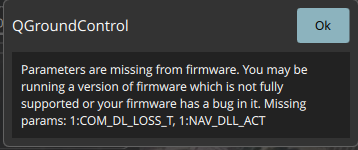
It looks like the sensors aren’t getting initialized properly, but I’m not sure if I should source some file or add some config from the px4 to the gazebo launch.
So my question is: Is it possible to setup the px4_sitl configuration so that a completely separate gazebo simulation is able to access the files and configurations?