PX4 Custom Board – SD Card Mounted but Cannot Save Parameters (tinybson write error)

Hi everyone,

I’m working on a custom PX4 flight controller based on STM32F427 (FMUv4-style design), and I’m currently facing an issue with SD card parameter storage.

Setup

  • MCU: STM32F427

  • PX4 Firmware: v1.14.0 (custom board)

  • OS: NuttX

  • SD card: Kingston 2GB (formatted as FAT32)

  • SDIO interface (4-bit mode, external module via wires ~20 cm)

Current Behavior

  • The SD card is detected and mounted correctly:

    /fs/microsd type vfat
    
  • The device node /dev/mmcsd0 is present

  • I can create directories:

    mkdir /fs/microsd/testsd
    

    and remove them successfully

However, when trying to save parameters:

param save

I get the following error:

ERROR [tinybson] killed: write error
ERROR [parameters] BSON encoder finalize failed
ERROR [parameters] parameter export to /fs/microsd/params failed (-1)
ERROR [param] Param save failed (-1)

Also:

  • logger fails to create log directory:

    ERROR [logger] failed creating log root dir: /fs/microsd/log
    
  • QGroundControl shows missing parameters (e.g. COM_DL_LOSS_T, NAV_DLL_ACT), likely because parameters are not persisted

Additional Observations

  • SD card is confirmed working on PC (FAT32)

  • Mount succeeds, but write operations fail

  • Reducing SDIO clock divider (even to very low speed) does not fix the issue

  • Using external SD module connected via wires (not on PCB)

Questions

  1. Could this behavior indicate a partially working SDIO bus (read/mount OK but write unstable)?

  2. Is this likely caused by signal integrity issues (long wires, noise, missing pull-ups)?

  3. Are there known requirements or best practices for SDIO wiring on custom PX4 boards (length, impedance, pull-ups)?

  4. Could this be related to missing DMA or incorrect SDIO configuration in board config?

Any guidance or similar experiences would be greatly appreciated!

Thanks in advance.
The most useful thing you can do is submit a draft PR with your custom board config against PX4-Autopilot (even WIP is fine) and upload a full boot console log or .ulg to logs.px4.io. Seeing your defconfig, board.h, init.c, and pin definitions will let us spot the problem directly. Without that we’re guessing.

Things to check against the fmu-v3/fmu-v4 reference boards (both STM32F427, same as yours):

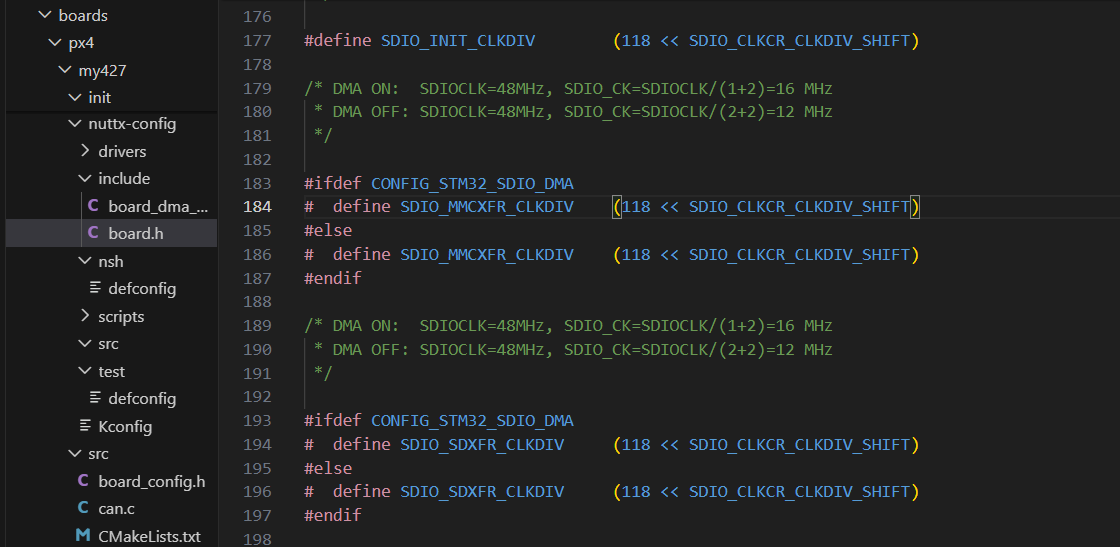
  1. Make sure you changed the right clock dividers. There are three in board.h. Mount and mkdir use the init clock (400 KHz), but param save does bulk writes at the data transfer clock. If you only lowered SDIO_INIT_CLKDIV, that won’t help:
// Init clock (400 KHz) -- NOT the one that matters for writes
#define SDIO_INIT_CLKDIV    (118 << SDIO_CLKCR_CLKDIV_SHIFT)

// Data transfer clocks -- THESE control param save speed:
#define SDIO_MMCXFR_CLKDIV  (1 << SDIO_CLKCR_CLKDIV_SHIFT)   // 16 MHz
#define SDIO_SDXFR_CLKDIV   (1 << SDIO_CLKCR_CLKDIV_SHIFT)   // 16 MHz

Try a much higher divider for the transfer clocks, like 23 (~2 MHz) or 47 (~1 MHz).

  1. Check for CONFIG_MMCSD_SDIOWAIT_WRCOMPLETE=y in your defconfig. Without it, NuttX doesn’t wait for the card’s write-complete signal before sending the next command. Small metadata ops (mkdir) can get away without it, bulk writes can’t.

  2. Check for DMA stream conflicts. SDIO uses DMA2 Stream 3 or Stream 6, Channel 4. If another peripheral in your config claims the same stream, writes will fail silently. Compare your DMA mappings against boards/px4/fmu-v3/nuttx-config/include/board_dma_map.h.

1 Like

Thank you very much for your help.

I would like to share the final result after testing, in case it helps others with a similar problem.

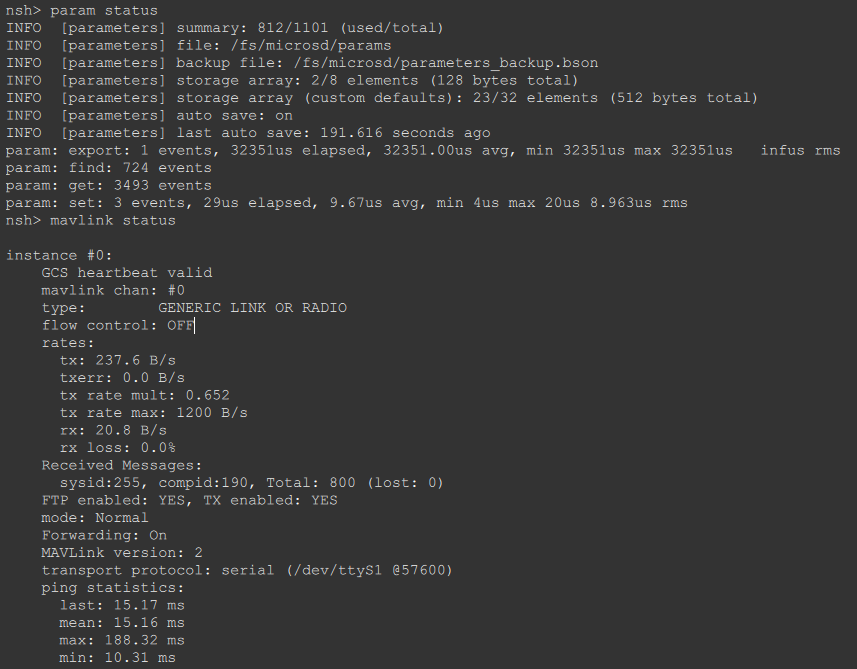
At first, I thought the SD card was the cause, because whenever I inserted the SD card, QGroundControl could not fully load the parameters and I could not enter the Setup page. However, after testing through NSH, I confirmed that the SD card itself was working properly. The board could mount the SD card, save parameters to /fs/microsd/params, and create log files normally.

After following the advice here, I checked the telemetry and MAVLink configuration more carefully. I found that the main issue was related to the telemetry link when QGroundControl was downloading parameters. TELEM1 was configured as the GCS port, but the parameter transfer was not stable enough, which caused QGC to get stuck while loading parameters.

After reducing the clock transmission frequency, the QGroundControl still failed to load the parameter. Then I came up with a solution: increasing the parameter loading capability via TELEM1.
Your TELEM1 is already on the default GCS port, but the default PX4 has MAV_0_RATE=1200 B/s on TELEM1. Try this:

param set MAV_0_RATE 0
reboot

TELEM1 is the default GCS MAVLink port with MAV_0_CONFIG=TELEM1, MAV_0_MODE=Normal, SER_TEL1_BAUD=57600, MAV_0_RATE=1200. Parameter loading errors in QGC are usually due to noisy or high-loss communication links, so this step is to eliminate link errors first.

I then reduced the MAVLink transmission rate by changing the corresponding parameter, and after that the situation improved significantly. QGroundControl was finally able to download parameters correctly and I could enter the Setup page without the previous error.

At the moment:

  • parameters are saved correctly

  • /fs/microsd/params is working

  • telemetry communication is stable

  • mavlink status shows a valid GCS heartbeat and no packet loss

  • QGC can now enter Setup normally

So the root cause was not the SD card itself, but the telemetry communication during parameter download.

I also attached screenshots and test outputs above to show the results more clearly.

Thank you again for your support. Your suggestions helped me narrow down the problem and solve it. Now I can continue by connecting the sensors and completing the setup for my drone.

1 Like

This topic was automatically closed 7 days after the last reply. New replies are no longer allowed.