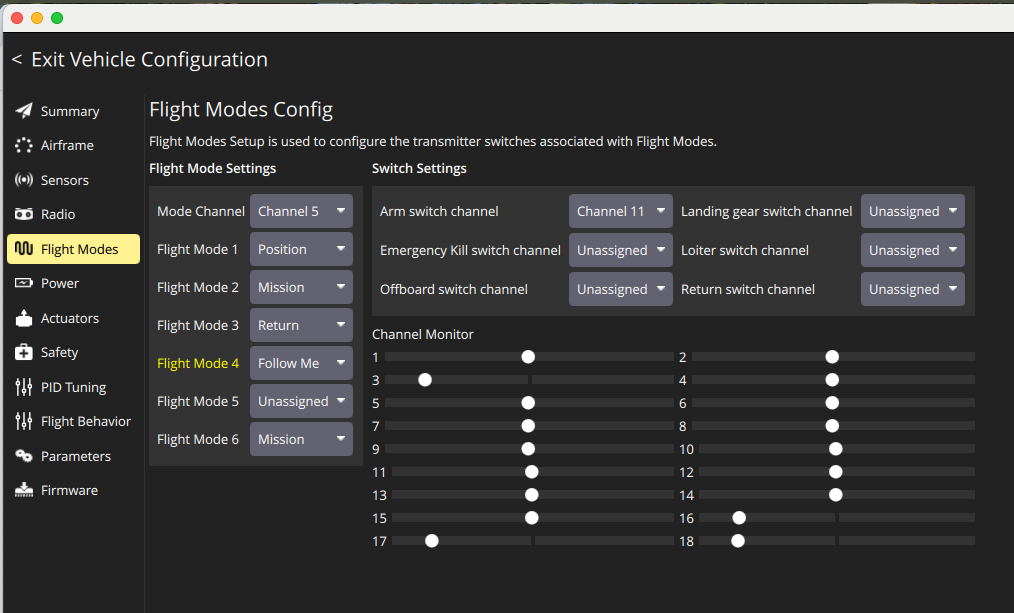
Flight Modes configuration is not green in QGroundControl. I simply copied the settings from the following section in setup. PX4 Flight Modes Setup | QGC Guide
Otherwise QGroundControl is showing Ready to Fly now. I took it outside and plugged the battery. I turned on the RC Radio. Silly question …. How do I get the propellers started?
I might have a similar issue, however mine does not say “Ready to fly”. In my summary section, Airframe, Sensors, Radio and Power have a green dot, however Flight Modes and Safety do not.
Hi @Shouider I am not sure if I am setting up the Flight Modes correctly. Can you please share why you configured the modes? I don’t see a green dot either.
@Shouider - make sure to select RC channel for “Mode Channel”.
@mcayci I assume you flying multicopter?
When setting “Mode Channel” - it’s channel of RC transmitter for mode selection - choose 3 position switch or 6 position switch. Depend on what is most comfortable for you. After that is set, try to change mode with selected switch - the yellow highlited text show which mode is currently selected. With 3 pos switch, you will be able to select only Mode 1, 4 and 6.
Setup your preffered modes with reference to Flight Modes (Multicopter) | PX4 Guide (main) .
To ARM the drone, you can use QGC command or RC transmitter (gesture - with left stick - or switch - in case of your picture would it be channel 11), refer Basic Concepts | PX4 Guide (main) to get more info about Arming and Disarming.
Our issues might not be that similar after all. I think my issue was not receiving a GPS signal, since I was attempting to use the Holybro X500 V2 with TX16S Mk II and R81 receiver, indoors. I believe the flight modes I tried required a steady gps signal, but when switching to Acro/Stabilized, and also configuring flight mode 1 to be Stabilized, I managed to get it to work.I still don’t have any green dots in the overview on Flight Modes and Safety