

Hello everyone!
I want to connect PX4 with a Raspberry to get ROS2 topics, to do so, i’ve followed all the instructions of the documentation : Raspberry Pi Companion with Pixhawk | PX4 Guide (v1.17)
My issue is that the MicroXRCEAgent isn’t transmitting ROS2 topics from PX4 to ROS2 on the raspberry.
I receive some data on the UART serial port of the raspberry because if I change the PX4 parameters :
- MAV_0_CONFIG=TELEM2
- SER_TEL2_BAUD=921600 8N1
- UXRCE_DDS_CFG=Disabled
to get the mavlink telemetry, I can receive data :
(python3-venv) root@raspberry:~# mavproxy.py --master=/dev/ttyAMA0 --baudrate 921600
Connect /dev/ttyAMA0 source_system=255
Log Directory:
Telemetry log: mav.tlog
Waiting for heartbeat from /dev/ttyAMA0
MAV> Detected vehicle 1:1 on link 0
online system 1
POSCTL> Mode POSCTL
fence breach
(It also prove that my RX/TX cables are not inverted and the Raspberry Pi 5 is configured well)
In order to setup the uxrce_dds_client on PX4, I’ve set those parameters :
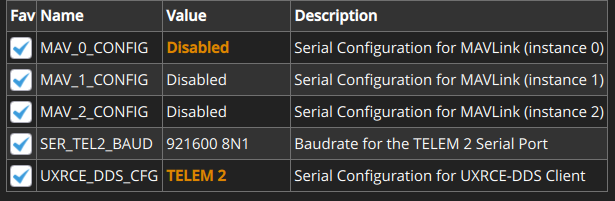
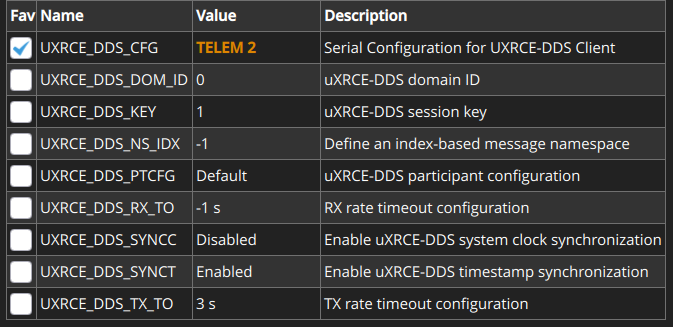
Then I’ve disconnected the power supply of the Pixhawk, which is a USB-C cable connected to my PC, and started the MicroXRCEAgent :
drone@raspberry:~$ MicroXRCEAgent serial --dev /dev/ttyAMA0 -b 921600 -v6
[1783957839.318658] info     | TermiosAgentLinux.cpp | init                     | running...             | fd: 3
[1783957839.319064] info     | Root.cpp           | set_verbose_level        | logger setup           | verbose_level: 6
After reconnecting the power supply of the Pixhawk, nothing moves on the MicroXRCEAgent logs.
And, the PX4 console shows that the uxrce_dds_client is Running but disconnected
nsh> uxrce_dds_client status
INFO [uxrce_dds_client] Running, disconnected
INFO [uxrce_dds_client] Using transport: serial
INFO [uxrce_dds_client] timesync converged: false
uxrce_dds_client: cycle: 0 events, 0us elapsed, 0.00us avg, min 0us max 0us 0.000us rms
uxrce_dds_client: cycle interval: 0 events, 0.00us avg, min 0us max 0us 0.000us rms
Also, the PX4 topics doesn’t appear on ROS2 :
drone@raspberry:~$ ros2 topic list
/parameter_events
/rosout
Here is my components versions :
- Pixhawk 6c
- PX4 v1.17 (flashed with QGroundControl)
- Raspberry Pi 5 (Ubuntu 24.04)
- MicroXRCEAgent v2.4.3 (build standalone, i’ve also tried the ROS2 build with ROS2 Jazzy)
- ROS2 (I’ve tried Jazzy and and Humble version)
Thanks for your help!
 , I tested the TX pin on the raspberry in doing a TX/RX loop because I was receiving data but not transmitting any of it, so the MicroXRCEAgent was not able to respond to the uxrce_dds_client on the Pixhawk.
 .
. )
)