

Hello, I have a Pixhawk PX4 PIX 2.4.8 32 Bit Flight Controller with the latest firmware and I have connected the gimbal servos to AUX1 and AUX2. Controlling it via RC controller works fine, but I can’t get it set up to control it via joystick from PC via mavlink. I use Qgroundcontrol on the PC. Does anyone know how to set this up? Thank you all in advance
There might be a few things missing in QGC to support that. Gimbal support is currently work in progress.
What sort of gimbal is that?
I’ve got two regular servos in there so far.
Is the gimbal support something that is added to QGC now - or its still not there?
Yes, that’s there. Give it a try.
@JulianOes Can you please let me know how can that be done - if there’s any documentation OR youtube video or so - unable to figure.
The option in Joystick to configure Gimbal Control Enable Gimbal Control isn’t really there when I searched for it (link says it should be there but I couldnt find it - see screenshot)
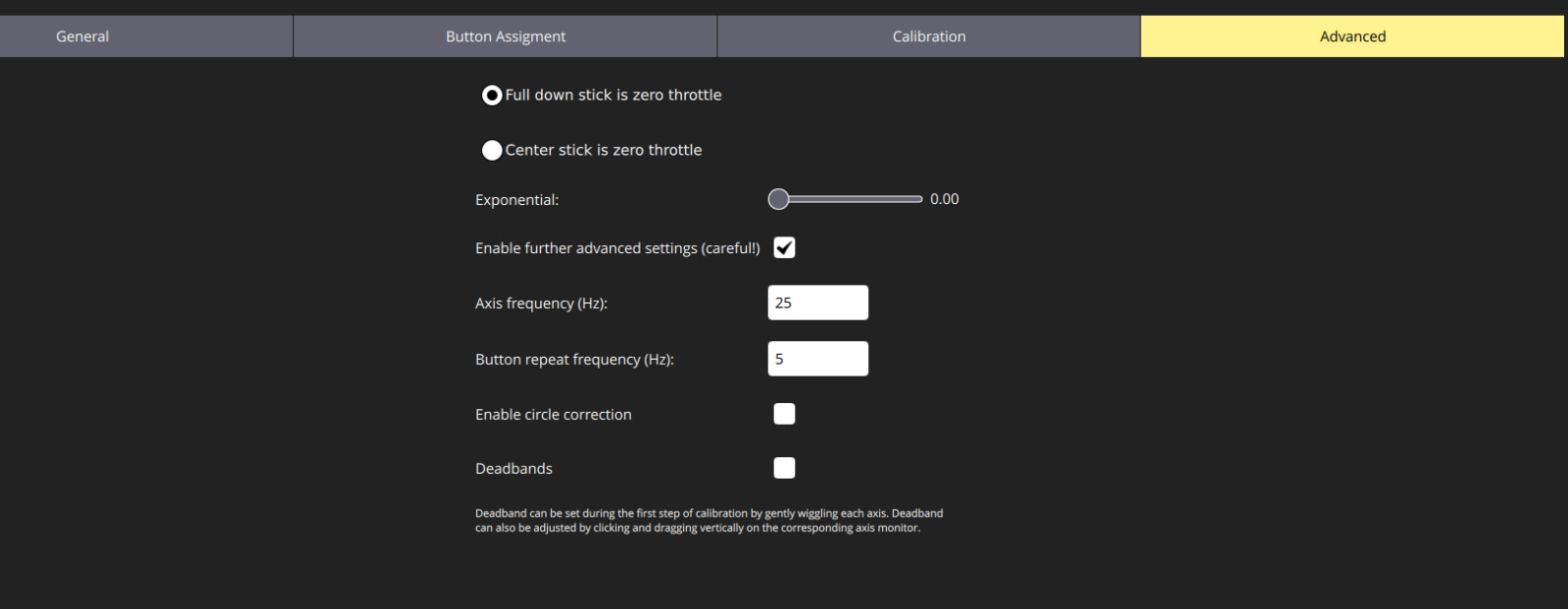
).
So, my requirement is to use 3 axes of the joystick follows:
- X Y axes for pitch yaw
- Z axes for zoom in / out
I was planning to use something like APEM HF55 for the same. I was unable to find the configuration which allows to do this. If this is not possible from qgc console, then I would assume only option would be to modify the code of qgc and achieve what I want - let me know if that is apt thinking..
First step is to set it up correctly in PX4, you can test it using gimbal status and gimbal test pitch -45 in MAVLink shell. Then make sure MNT_MODE_IN is gimbal v2.
@JulianOes Assuming I’ve done the setup correctly, how do I configure the joystick for gimbal? Where is it in the qgc settings?
I would have to check but you can set a button to map to Gimbal up/down for instance.