Hi everyone,
I’m trying to flash PX4 firmware onto a flight controller over USB on Windows 10. On QGroundControl’s Firmware page, I can select the port, but the selection clears before I can start flashing.
I downloaded QGC from the official release page tagged v5.1.5, titled “QGroundControl V5.1 - Stable”. QGroundControl release on GitHub
Steps to reproduce
- Open Vehicle Configuration → Firmware.
- Open the port dropdown and select
COM5 — USB 串行设备 (“USB Serial Device”).
- COM5 appears in the selected field and the Flash button becomes enabled.
- Shortly afterward, the field goes blank and Flash becomes disabled. I can select COM5 again, but the same sequence repeats.
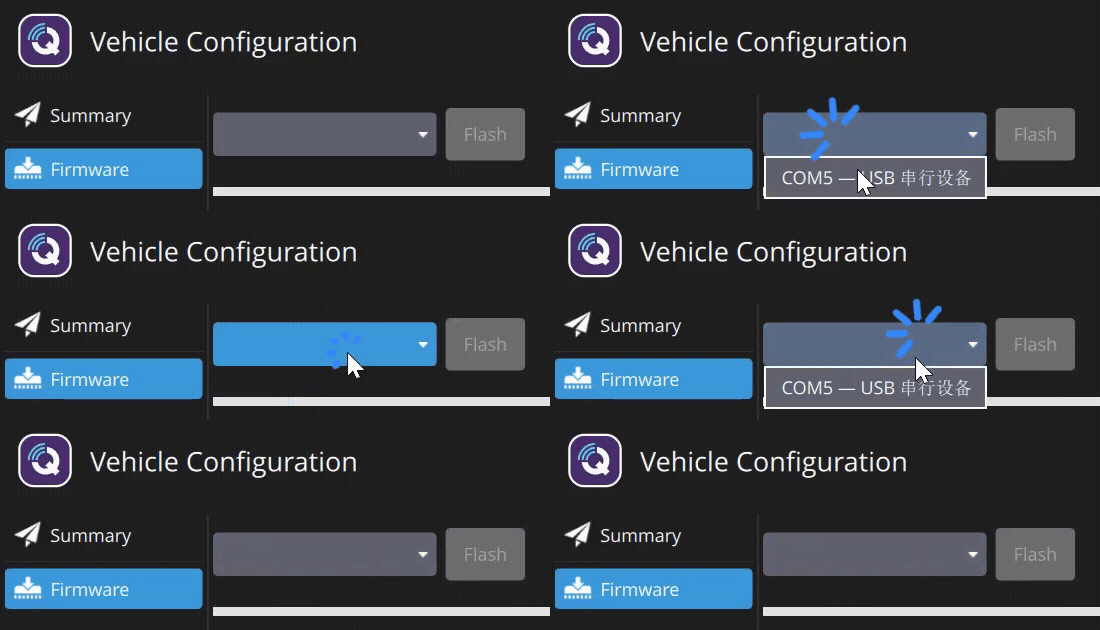
I expected COM5 to stay selected for as long as the port was available. I saw no error message or flashing progress. I haven’t yet checked whether COM5 also disappears from Windows Device Manager at the moment the QGC selection clears.
Has anyone seen this with the v5.1.5 download on Windows 10? Which QGC log should I capture, and what should I record in Device Manager during a retry to tell whether Windows is losing the port or QGC is clearing the selection while the port is still present?
Hi gfLv_amov,
I checked the QGroundControl v5.1.5 source, and there is a specific selection-refresh path worth investigating.
In FirmwareUpgrade.qml, _refreshSelection() runs when controller.availablePorts changes. It only preserves the selected port if it is recognized as a Pixhawk or SiK Radio. Otherwise, it falls back to _preselectIndex(), which returns -1 when no recognized board is present.
The firmware upgrade worker also periodically rebuilds the available port list.
This means COM5 may remain present in Windows while QGC clears the selection because the device is classified as BoardTypeUnknown. It is a plausible code-level explanation, not yet a confirmed diagnosis.
To distinguish the two cases, could you check:
-
Whether COM5 remains continuously visible in Windows Device Manager when the QGC selection clears.
-
The device’s Hardware IDs (VID/PID), manufacturer, and USB serial number, if available.
-
Whether the port remains listed in QGC’s dropdown after the selection becomes blank.
-
The QGC application log around the selection reset, particularly firmware-upgrade and serial-port discovery messages.
You can use QGC’s App Log Viewer or enable logging from the command line. The relevant categories include Vehicle.VehicleSetup.FirmwareUpgradeController and Vehicle.VehicleSetup.PX4FirmwareUpgradeThread.Verbose.
If COM5 remains present throughout, I would investigate the QML selection-refresh logic and board recognition before changing Windows drivers.
Could you also share the exact flight controller model?
Relevant source:
Best regards,
Yiğitcan Öztürk
PAMILANGA LIMITED

